A campus brand isn’t a logo in a drawer. It’s the thing a department chair, a new hire, and a freelance designer all reach for at 4:55 on a Friday — and either find usable, or don’t. We went looking for the higher-ed guides that get this right: clear, alive, and built to be used. Here are our superlatives, with a link to every guide so you can go see for yourself.
A great brand guide does one quiet, powerful thing: it hands everyone on your team the same tools, so they can do their best work without asking permission. That’s the whole idea. The schools below have built systems that equip their communities instead of policing them — and a few have leapt ahead into accessibility-first and AI-native territory that the rest of the sector is only starting to think about.
We handed out the awards. You take the ideas.
🏆 Best Entrepreneurial Brand — Babson College
🔗 Babson College Brand Guidelines
Babson did the hardest thing in higher-ed branding: it found a single, ownable idea and built everything on top of it. The whole system orbits “Entrepreneurial Leadership” and the school’s proprietary “Entrepreneurial Thought & Action” framework — so the voice is genuinely theirs, not generic-academic. Headlines like “From Problems to Possibilities” sound like Babson and only Babson.
Three things worth stealing:
- One idea, expressed everywhere. Action-oriented language (“Hands-On,” “Experiential”) flows straight from the positioning. The brand voice isn’t decoration; it’s the strategy made audible.
- A disciplined wordmark architecture. A clean four-tier system — College → schools → centers & institutes → departments — keeps a sprawling institution visually unified. (See the Wordmark & Logo page.)
- A brand that practices what it teaches. Babson explicitly lets enrolled students use its marks, royalty-free, for revenue-generating ventures. An entrepreneurship school that hands its students the brand as a tool — that’s the philosophy and the identity agreeing with each other.
Also smart: a restrained spine of one preferred wordmark color (PMS 3425 green) and two purposeful typefaces (Trade Gothic Condensed + PMN Caecilia), plus an actual Brand Glossary so everyone shares a vocabulary.
Why it wins: Most schools describe themselves. Babson positions itself — and the brand system makes that position impossible to dilute.
🏆 Best Health-Sciences Brand — Tufts University School of Medicine
🔗 Tufts University Brand Guidelines · (School of Medicine lockup under Logos & Lockups)
Medical and health-sciences schools live a constant tension: they need their own gravity, but they can’t drift away from the parent university. Tufts solves it elegantly with a lockup system — every school, including the School of Medicine, connects to the parent mark through a formal, governed treatment that visually says “we are distinctly us, and unmistakably Tufts.”
Three things worth stealing:
- Architecture, not improvisation. The School of Medicine doesn’t get a one-off logo; it gets a lockup (the Tufts mark in official blue + the school name) that expresses exactly how it relates to the university. That’s brand architecture doing the work.
- Craft you can feel. The Tufts wordmark was “sculpted especially for Tufts,” and the guide flatly forbids reconstructing it. Clear space is defined by the cap-height of the “T.” Rules this precise are a sign a brand is taken seriously.
- Governance that prevents drift. All lockups are produced centrally by University Communications and Marketing, so a busy research-and-clinical unit can’t accidentally wander off-brand — and the branding policy covers cobranding, which any hospital-affiliated medical school needs.
Why it wins: It keeps a complex, high-stakes medical identity coherent under one university roof — the exact problem every academic health center is trying to solve.
🏆 Most AI-Native — Arizona State University
🔗 ASU AI Guidelines (inside the brand guide)
Plenty of schools have an AI memo buried in an IT policy. ASU put AI guidance inside the brand guide itself — where the people actually making things will find it — and made it refreshingly concrete.
What it actually says:
- AI is a springboard, not a shortcut. It requires human iteration, with explicit awareness of bias and copyright.
- Permitted: image retouching (removing a stray coffee cup, lens flares), denoising, background extension, mood boards, fully abstracted (non-photorealistic) illustration, research and brainstorming.
- Prohibited: photorealistic fakes, altering campus architecture or identity marks, AI-generated typography, and photorealistic images of recognizable people.
- Transparency required: AI-assisted images must be credited with the specific tool used, and the guide links to a curated list of ASU-approved AI tools.
It’s operational, tool-aware, and written for communicators rather than lawyers — the most genuinely “AI-native” brand guidance we found in the sector.
The contrarian honorable mention — Most AI-Cautious: Boise State University, which takes the opposite hard line and bans AI- and stock-generated imagery outright. Read ASU and Boise State back to back and you’ve got the whole 2026 debate in two tabs. (Also worth a look: NYU’s generative-AI guidelines for communicators, baked right into the brand guidelines.)
Why it wins: No university yet ships an AI brand assistant — so in 2026, “AI-native” means having thought hard about AI. Nobody has thought harder, or more usefully, than ASU.
🏆 Best Glow-Up — MIT
MIT’s recent refresh simplified the logo and leaned into a vibrant core-plus-secondary palette chosen to signal “vitality and dynamism.” The online hub is clean and practical, with do/don’t galleries and real-world application mockups that show the system living in the wild rather than sitting in a spec. Proof that even a famously buttoned-up institution can modernize without losing itself.
Why it wins: A confident modern refresh that reads as energy, not reinvention.
🏆 Best Typographic System — Yale University
🔗 Yale Identity · (full 2024 brand guidelines PDF)
Yale commissioned a custom proprietary “Yale” typeface and then used it everywhere — logo and web headings — for a typographic coherence most universities only dream about. Anchored on the unmistakable Yale Blue (#00356b), the system feels inevitable, which is the highest compliment you can pay an identity.
Why it wins: When your typeface is your brand, every headline does identity work for free.
🏆 Best Art & Design School Brand — Rhode Island School of Design (RISD)
You’d expect an art school’s brand to be good. RISD’s is expressive. Built around the idea “question to create, create to question,” it features three custom display typefaces (drawn by a RISD alum), a striking minimal palette, and a modular, layering system that behaves more like a living visual language than a rulebook. It looks like the place it represents.
Why it wins: It proves a brand system can be rigorous and genuinely creative at the same time.
🏆 Best Accessibility Guidance — The University of Texas at Austin
UT Austin treats accessibility as brand infrastructure, not an afterthought — tying its guidelines to formal standards (Texas Admin Code 206.70 / Section 508), a real Web Accessibility Policy, automated testing, and accessible-signage rules. With WCAG 2.1 AA compliance becoming a 2026 legal requirement for many public institutions, this is the model to copy now.
Why it wins: It bakes “everyone can read it” into the brand itself — which is where accessibility belongs.
🏆 Best Big Public Flagship — University of Michigan
🔗 Michigan Brand (“Michigan Commons”)
Michigan’s “Michigan Commons” is a genuine one-stop hub: iconic Maize & Blue, a current downloadable style guide, and a memorable internal voice (“THE BRAND. THE BRAND. THE BRAND.”). It’s what a flagship public’s brand home should be — comprehensive, findable, and easy for thousands of contributors to actually use.
Why it wins: Scale is the enemy of consistency, and Michigan tamed it with one well-organized front door.
Honorable mentions
A few more guides worth your time:
- Stanford Identity — Best Classic Identity. Cardinal red treated with near-religious precision; the wordmark handled as “artwork, not a font.”
- Carnegie Mellon Brand — Most Characterful. Ownable Tartan patterns and “Scotty” dog illustrations turn heritage into design assets.
What the best ones have in common
Read enough of these and a pattern emerges. The standout guides are:
- Built on one ownable idea (Babson’s entrepreneurship, RISD’s questioning) — not a list of rules, but a point of view.
- Architected to scale (Tufts’ lockups, Michigan’s hub) so sub-brands stay coherent.
- Accessibility-first (UT Austin) — because in 2026 it’s both the right thing and, increasingly, the law.
- Thinking about AI out loud (ASU, Boise State, NYU) instead of pretending it isn’t here.
- Alive, not archived. The best of these are living web experiences you can search, copy from, and download — not a PDF decaying in a shared drive.
That last one is the quiet revolution. A brand guide that lives on the web — where anyone can copy a hex code, grab the right logo, or check the voice in ten seconds — turns the brand from a gate into a gift. That’s the difference between a guide people obey and a guide people use.
It’s also exactly what we’re building with Viv BrandOS — a living brand guide that travels with your team and works while you sleep. If your guidelines are a PDF nobody opens, let’s talk. We equip our clients with powerful tools to support their missions. Yours should be one of them.
Wait — is this a brand guide or a design system?
Fair question. We’ve been celebrating brand guides, but the most ambitious schools on this list are quietly building something more — a design system — and the line between the two is where the next decade of this work happens. So let’s draw it clearly.
A brand guide governs expression. It’s for humans deciding how the institution should look, sound, and feel: the logo, the color, the typefaces, the voice, the do’s and don’ts. It answers “what does this feel like?”
A design system governs production. It’s the operational layer designers and developers build from: reusable UI components, design tokens (your colors, type, and spacing encoded as named, machine-readable values), interaction patterns, governance, and — crucially — accessibility baked in as code, not advice. It answers “how do we build it, correctly, every time, at speed?” The canonical examples come from outside the academy: the U.S. Web Design System (USWDS), IBM’s Carbon, Google’s Material. Each ships components an engineer can drop into a real product, with the brand and the accessibility already inside them.
Here’s the thing nobody tells you: the best programs need both, and the two are merging. Design tokens are the bridge. The same gold — #f4c44c — is a brand decision in the guide and a token in the system, and when those are the same living value, your PDF and your production website can never quietly drift apart. That fused thing has a name we like: a brand operating system.
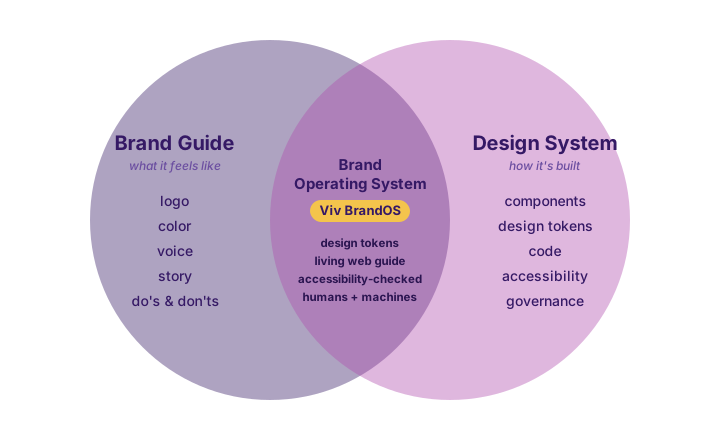
So, to answer plainly: this — Viv BrandOS — isn’t (just) a brand guide. It’s a design system too. It’s the overlap in that diagram, deliberately. Our BrandOS swipebook reads like a beautiful guide — the story, the myth, the voice — but it behaves like a system: every color is a click-to-copy design token (hex, RGB, and CSS variable, the same value that powers every surface), the type pages are live specimens rather than screenshots, the components and motion are real, and accessibility isn’t a footnote — there’s a live WCAG contrast checker built into the guide itself. Pick any two brand colors and it tells you, on the spot, whether they clear AA. The guide checks its own work.
That contrast checker is the whole argument in miniature, and higher ed has a hard lesson to prove why. In 2015, the National Association of the Deaf sued both Harvard and MIT (NAD v. Harvard; NAD v. MIT), alleging their public online videos, lectures, and free online courses were inaccessible to deaf and hard-of-hearing people — many uncaptioned, others captioned so badly as to be “inaccurate or incoherent” — in violation of the Americans with Disabilities Act and Section 504 of the Rehabilitation Act. Harvard’s 2019 settlement, entered as a class-action consent decree in early 2020, committed it to caption its public online content to professional-grade quality going forward. Harvard, for its part, now ships the HarvardSites Design System — a real pattern library built for “accessible and scalable” university websites, with the policy standards baked in. You can read that sequence two ways, but here’s ours: accessibility you write down in a PDF is a promise; accessibility you build into the system is a guarantee. The lawsuit is what happens when it lives only in the document. The contrast checker — and a design system that won’t let you ship an unreadable pairing — is what it looks like when it lives in the tool.
There’s one more place the best programs go further. Most design systems are built for the website — Harvard’s HarvardSites Design System is an excellent, deliberately site-focused example. But a brand operating system shouldn’t stop at the homepage. A social post, a brochure, a slide deck, an admissions email — these reach as many people as any web page, and they deserve the same systematized, accessible thinking: the same readable contrast, the same alt text and plain language, the same on-brand templates. So we’d give two things equal weight, not one each: a brand guide and a design system, and web and non-web outputs. A social graphic should be as accessible and as easy to make right as a landing page.
Which lands us right back where this whole post started. A brand guide tells your team what good looks like. A design system makes good the path of least resistance — the easy thing, the default, the click. Blend them, and you stop hoping people stay on brand and start equipping them to. That’s the difference between a guide people obey and a guide people use — and it’s exactly what we mean when we say we equip our clients with powerful tools to support their missions.
The words everyone mixes up: a quick glossary
If the brand-guide-vs-design-system line felt slippery, you’re not imagining it. Nobody uses these words the same way twice. A marketer says “style guide” and means the whole brand; a designer hears “the visual rules”; an editor thinks you mean commas and capitalization. They’re not wrong — they’re standing in different rooms of the same house. Most of these terms aren’t synonyms; they’re layers, each answering a different question. Tufts University School of Medicine is a tidy real-world proof: its communications resources page lists Brand Guidelines, Logo Guidelines, Logos & Lockups, an Editorial Style Guide, a Social Media Guide and a separate Policy for Official Social Media Accounts, Accessibility Guidelines, and Web Standards & Policies — all on one page, all distinct documents, all clearly necessary. Here’s how they fit together.
♿ One thread runs through all of it: accessibility. It’s tempting to file accessibility under “Rules & policy” (the WCAG entry below) and move on — but that’s the one mistake the best programs don’t make. Accessibility isn’t a layer; it’s a thread woven through every layer. In Expression, it’s color contrast that clears WCAG AA and type sized to actually be read. In Words, it’s plain language, link text that means something out of context, and alt text on every image. In Identity & structure, it’s logos and lockups that stay legible small and survive in a single color. In Rules & policy, it’s the WCAG and legal floor that makes the rest non-optional. And in the System, it’s accessible components and tokens so the right thing is the default thing. Pull accessibility out of any one of these and you’ve left a door unlocked.
⏪ Shift left: Shift left means moving accessibility and brand-correctness earlier — building them into the design system, the tokens, and the components, so the work is right by default. The opposite, shift right, is catching problems in an audit at the very end — the expensive, too-late place, after something has already shipped (or after a complaint). The whole argument earlier in this post is shift-left vs. shift-right in one picture: the live WCAG contrast checker in Viv BrandOS catches an unreadable color pairing before it ships; the NAD v. Harvard lawsuit is what shift-right looks like when accessibility lives only in a document and nobody checks until someone is harmed. A guide that checks its own contrast fixes the problem at the design stage, not after a lawsuit.
Expression — how the brand looks, sounds, and feels
- Brand Guidelines / Brand Guide — The umbrella. The whole governing document for how your institution presents itself: logo, color, type, voice, story, and the do’s and don’ts. Often used loosely to mean any one of the things underneath it, which is how the confusion starts.
- Style Guide (visual) — The look-and-feel chapter of the brand guide: logo usage, color values, typography, imagery, layout. Don’t confuse this with the editorial style guide below — same two words, completely different domain.
- Visual Identity — The actual kit of visual elements (marks, palette, typefaces, graphic devices) the visual style guide governs. The identity is the assets; the style guide is the rules for using them.
- Brand Voice vs. Tone of Voice — Voice is your brand’s constant personality — warm, plainspoken, a little mythic — the part that never changes; tone is how that voice flexes by context — the same brand sounds celebratory in a launch and steady in a service outage. One identity, many registers.
Words — the language layer
- Editorial / Content Style Guide — The rules for language: grammar, capitalization, numbers, the Oxford comma, preferred terms, and whether you follow AP style or a house style of your own. The thing everyone forgets is a separate document from the visual style guide — until two pages spell “alumni” three different ways.
Identity & structure
- Logo vs. Wordmark vs. Lockup — A logo is any identifying mark; a wordmark is a logo made of the name set in distinctive type (Yale’s, Stanford’s); a lockup is a fixed, governed combination of elements held in a set relationship — the Tufts School of Medicine mark, where the university wordmark and the school name lock together in an approved arrangement nobody is allowed to rebuild by hand.
- Brand Architecture — How the parent brand relates to its sub-brands: schools, departments, centers, ventures. It’s the org chart made visual — Babson’s four-tier wordmark system and Tufts’ lockups are brand architecture answering “how does this unit show that it’s part of the whole?”
Rules & policy — what’s allowed, and who decides
- Social Media Guide vs. Social Media Policy — A guide tells you how to show up: voice, post formats, hashtags, image specs — craft advice. A policy sets the rules: who is authorized to run an official account, what’s required for compliance and crisis response, and what happens if you break them — governance. Tufts publishes both, on purpose, because “sound like us” and “you may post on our behalf” are different promises.
- Web Standards & Policies — The technical and editorial rules for official websites: required platforms, URL and domain conventions, privacy and accessibility obligations, who may publish. The web’s version of the social media policy.
- Accessibility Guidelines (WCAG) — The standard that makes content usable by everyone, including people using assistive technology. WCAG 2.1 AA is the bar most institutions are held to — and, increasingly, the legal one. As the lawsuits earlier in this post show, this is the line where “guideline” stops being optional.
System — how good gets built, every time
- Design System — The production layer. The operational kit designers and developers build from: components, tokens, patterns, and accessibility encoded as code rather than advice. Where the brand guide says what good looks like, the design system makes good the default.
- Design Tokens — Your brand decisions encoded as named, machine-readable values —
color-gold: #f4c44cinstead of “the gold.” The bridge between guide and system: change the token, and every surface updates at once. No drift. - Pattern / Component Library — The reusable building blocks — buttons, cards, navigation, forms — already on-brand and already accessible, so nobody rebuilds (or breaks) them from scratch.
- Templates — Pre-built, on-brand starting points for real documents: slide decks, letterhead, social graphics, email. The most-used artifact and the most-overlooked one — templates are where a system meets the person at 4:55 on a Friday.
- Brand Operating System — Our name for the blend: a brand guide and a design system fused into one living thing, joined at the tokens. It reads like a guide and behaves like a system — the overlap in the Venn above.
The short version: a brand guide tells people what good looks like, a design system makes good the default, and a brand operating system is both at once. That’s the whole point of untangling these words — once you can see the layers, you can see which ones your team is missing.
All links above — including the design-system references (USWDS, IBM Carbon, the HarvardSites Design System), the Tufts School of Medicine communications resources page cited in the glossary, and the sources behind the NAD v. Harvard / NAD v. MIT summary — were verified to resolve at the time of writing (June 2026). University and government sites occasionally move pages or block automated checks; if a deep link 404s, start from the organization’s main domain. The lawsuit account is drawn from public reporting and court records; superlatives are editorial and affectionate — every school here is doing something right.